Scott Hanselman

Dynamically generating robots.txt for ASP.NET Core sites based on environment

June 18, 2019 Comment on this post [4] Posted in ASP.NET | DotNetCore | Open Source
Sponsored By

I'm putting part of older WebForms portions of my site that still run on bare metal to ASP.NET Core and Azure App Services, and while I'm doing that I realized that I want to make sure my staging sites don't get indexed by Google/Bing.

I already have a robots.txt, but I want one that's specific to production and others that are specific to development or staging. I thought about a number of ways to solve this. I could have a static robots.txt and another robots-staging.txt and conditionally copy one over the other during my Azure DevOps CI/CD pipeline.

Then I realized the simplest possible thing would be to just make robots.txt be dynamic. I thought about writing custom middleware but that sounded like a hassle and more code that needed. I wanted to see just how simple this could be.

  • You could do this as a single inline middleware, and just lambda and func and linq the heck out out it all on one line
  • You could write your own middleware and do lots of options, then activate it bested on env.IsStaging(), etc.
  • You could make a single Razor Page with environment taghelpers.

The last one seemed easiest and would also mean I could change the cshtml without a full recompile, so I made a RobotsTxt.cshtml single razor page. No page model, no code behind. Then I used the built-in environment tag helper to conditionally generate parts of the file. Note also that I forced the mime type to text/plain and I don't use a Layout page, as this needs to stand alone.

@page
@{
Layout = null;
this.Response.ContentType = "text/plain";
}
# /robots.txt file for http://www.hanselman.com/
User-agent: *
<environment include="Development,Staging">Disallow: /</environment>
<environment include="Production">Disallow: /blog/private
Disallow: /blog/secret
Disallow: /blog/somethingelse</environment>

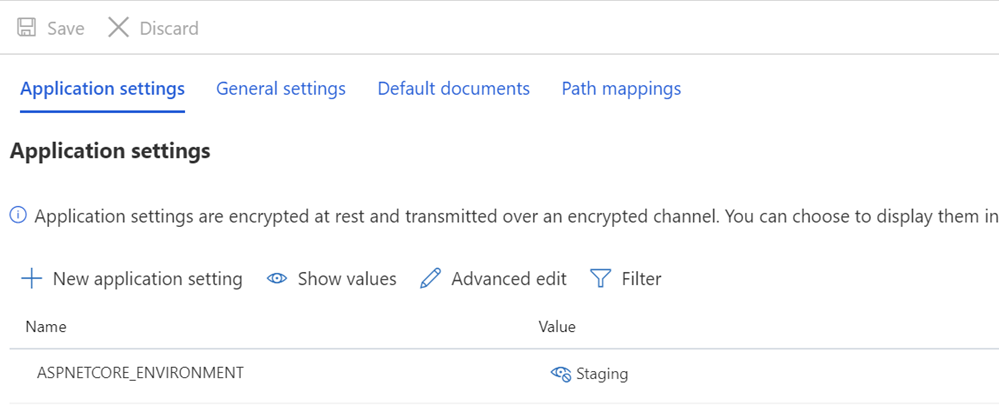
I then make sure that my Staging and/or Production systems have ASPNETCORE_ENVIRONMENT variables set appropriately.

ASPNETCORE_ENVIRONMENT=Staging

I also want to point out what may look like odd spacing and how some text is butted up against the TagHelpers. Remember that a TagHelper's tag sometimes "disappears" (is elided) when it's done its thing, but the whitespace around it remains. So I want User-agent: * to have a line, and then Disallow to show up immediately on the next line. While it might be prettier source code to have that start on another line, it's not a correct file then. I want the result to be tight and above all, correct. This is for staging:

User-agent: *
Disallow: /

This now gives me a robots.txt at /robotstxt but not at /robots.txt. See the issue? Robots.txt is a file (or a fake one) so I need to map a route from the request for /robots.txt to the Razor page called RobotsTxt.cshtml.

Here I add a RazorPagesOptions in my Startup.cs with a custom PageRoute that maps /robots.txt to /robotstxt. (I've always found this API annoying as the parameters should, IMHO, be reversed like ("from","to") so watch out for that, lest you waste ten minutes like I just did.

public void ConfigureServices(IServiceCollection services)
{
services.AddMvc()
.AddRazorPagesOptions(options =>
{
options.Conventions.AddPageRoute("/robotstxt", "/Robots.Txt");
});
}

And that's it! Simple and clean.

You could also add caching if you wanted, either as a larger middleware, or even in the cshtml Page, like

context.Response.Headers.Add("Cache-Control", $"max-age=SOMELARGENUMBEROFSECONDS");

but I'll leave that small optimization as an exercise to the reader.

UPDATE: After I was done I found this robots.txt middleware and NuGet up on GitHub. I'm still happy with my code and I don't mind not having an external dependency, but it's nice to file this one away for future more sophisticated needs and projects.

How do you handle your robots.txt needs? Do you even have one?


Sponsor: Get the latest JetBrains Rider with WinForms designer, Edit & Continue, and an IL (Intermediate Language) viewer. Preliminary C# 8.0 support, rename refactoring for F#-defined symbols across your entire solution, and Custom Themes are all included.

About Scott

Scott Hanselman is a former professor, former Chief Architect in finance, now speaker, consultant, father, diabetic, and Microsoft employee. He is a failed stand-up comic, a cornrower, and a book author.

facebook bluesky subscribe
About   Newsletter
Hosting By
Hosted on Linux using .NET in an Azure App Service

Making a tiny .NET Core 3.0 entirely self-contained single executable

June 13, 2019 Comment on this post [18] Posted in DotNetCore
Sponsored By

I've always been fascinated by making apps as small as possible, especially in the .NET space. No need to ship any files - or methods - that you don't need, right? I've blogged about optimizations you can make in your Dockerfiles to make your .NET containerized apps small, as well as using the ILLInk.Tasks linker from Mono to "tree trim" your apps to be as small as they can be.

Work is on going, but with .NET Core 3.0 preview 6, ILLink.Tasks is no longer supported and instead the Tree Trimming feature is built into .NET Core directly.

Here is a .NET Core 3.0 Hello World app.

225 files, 69 megs

Now I'll open the csproj and add PublishTrimmed = true.

<Project Sdk="Microsoft.NET.Sdk">
<PropertyGroup>
<OutputType>Exe</OutputType>
<TargetFramework>netcoreapp3.0</TargetFramework>
<PublishTrimmed>true</PublishTrimmed>
</PropertyGroup>
</Project>

And I will compile and publish it for Win-x64, my chosen target.

dotnet publish -r win-x64 -c release

Now it's just 64 files and 28 megs!

64 files, 28 megs

If your app uses reflection you can let the Tree Trimmer know by telling the project system about your Assembly, or even specific Types or Methods you don't want trimmed away.

<ItemGroup>
<TrimmerRootAssembly Include="System.IO.FileSystem" />
</ItemGroup>

The intent in the future is to have .NET be able to create a single small executable that includes everything you need. In my case I'd get "supersmallapp.exe" with no dependencies. That's done using PublishSingleFile along with the RuntimeIdentifier in the csproj like this:

<Project Sdk="Microsoft.NET.Sdk">
<PropertyGroup>
<OutputType>Exe</OutputType>
<TargetFramework>netcoreapp3.0</TargetFramework>
<PublishTrimmed>true</PublishTrimmed>
<PublishReadyToRun>true</PublishReadyToRun>
<PublishSingleFile>true</PublishSingleFile>
<RuntimeIdentifier>win-x64</RuntimeIdentifier>
</PropertyGroup>
</Project>

At this point you've got everything expressed in the project file and a simple "dotnet publish -c Release" makes you a single exe!

There's also a cool global utility called Warp that makes things even smaller. This utility, combined with the .NET Core 3.0 SDK's now-built-in Tree Trimmer creates a 13 meg single executable that includes everything it needs to run.

C:\Users\scott\Desktop\SuperSmallApp>dotnet warp
Running Publish...
Running Pack...
Saved binary to "SuperSmallApp.exe"

And the result is just a 13 meg single EXE ready to go on Windows.

A tiny 13 meg .NET Core 3 application

If you want, you can combine this "PublishedTrimmed" object with "PublishReadyToRun" as well and get a small AND fast app.

<Project Sdk="Microsoft.NET.Sdk">
<PropertyGroup>
<OutputType>Exe</OutputType>
<TargetFramework>netcoreapp3.0</TargetFramework>
<PublishTrimmed>true</PublishTrimmed>
<PublishReadyToRun>true</PublishReadyToRun>
</PropertyGroup>
</Project>

These are not just IL (Intermediate Language) assemblies that are JITted (Just in time compiled) on the target machine. These are more "pre-chewed" AOT (Ahead of Time) compiled assemblies with as much native code as possible to speed up your app's startup time. From the blog post:

In terms of compatibility, ReadyToRun images are similar to IL assemblies, with some key differences.

  • IL assemblies contain just IL code. They can run on any runtime that supports the given target framework for that assembly. For example a netstandard2.0 assembly can run on .NET Framework 4.6+ and .NET Core 2.0+, on any supported operating system (Windows, macOS, Linux) and architecture (Intel, ARM, 32-bit, 64-bit).
  • R2R assemblies contain IL and native code. They are compiled for a specific minimum .NET Core runtime version and runtime environment (RID). For example, a netstandard2.0 assembly might be R2R compiled for .NET Core 3.0 and Linux x64. It will only be usable in that or a compatible configuration (like .NET Core 3.1 or .NET Core 5.0, on Linux x64), because it contains native code that is only usable in that runtime environment.

I'll keep exploring .NET Core 3.0, and you can install the SDK here in minutes. It won't mess up any of your existing stuff.


Sponsor: Suffering from a lack of clarity around software bugs? Give your customers the experience they deserve and expect with error monitoring from Raygun.com. Installs in minutes, try it today!

About Scott

Scott Hanselman is a former professor, former Chief Architect in finance, now speaker, consultant, father, diabetic, and Microsoft employee. He is a failed stand-up comic, a cornrower, and a book author.

facebook bluesky subscribe
About   Newsletter
Hosting By
Hosted on Linux using .NET in an Azure App Service

Visual Studio Code Remote Development over SSH to a Raspberry Pi is butter

June 11, 2019 Comment on this post [12] Posted in Hardware | Open Source | Python
Sponsored By

There's been a lot of folks, myself included, who have tried to install VS Code on the Raspberry Pi. In fact, there's a lovely process for this now. However, we have to ask ourselves is a Raspberry Pi really powerful enough to be running a full development environment and the app being debugged? Perhaps, but maybe this is a job for remote debugging. That means installing Visual Studio Code locally on my Windows or Mac machine, then having Visual Studio code install its headless server component (for ARM7) on the Pi.

In January I blogged about Remote Debugging with VS Code on a Raspberry Pi using .NET Core on ARM. It was, and is, a little hacked together with SSH and wishes. Let's set up a proper VS Code Remote environment so I can be productive on a Pi while still enjoying my main laptop's abilities.

  • First, can you ssh into your Raspberry Pi without a password prompt?
    • If not, be sure to set that up with OpenSSH, which is now installed on Windows 10 by default.
    • You know you've got it down when you can "ssh pi@mypi" and it just drops you into a remote prompt.
  • Next, get Visual Studio Code Insiders plus

From within VS Code Insiders, hit Ctrl/CMD+P and type "Remote-SSH" for some of the choices.

Remote-SSH options in VS Code

I can connect to Host and VS Code will SSH into the PI and install the VS Code server components in ~./vscode-server-insiders and then connect to them. It will take a minute as its downloading a 25 meg GZip and unzipping it into this temp folder. You'll know you're connected when you see this green badge as seen below that says "SSH: hostname."

Green badge in VS Code - SSH: crowpi

Then when you go "File | Open Folder" from the main menu, you'll get the remote system's files! You are working and editing locally on remote files.

My Raspberry Pi's desktop, remotely

Note here that some of the extensions are NOT installed locally! The Python language services (using Jedi) are running remotely on the Raspberry Pi, so when I get intellisense, I'm getting it remoted from the actual machine I'm developing on, not a guess from my local box.

Some extentions are local and others are remote

When I open a Terminal with Ctrl+~, see that I'm automatically getting a remote terminal and I've even running htop in it!

Check this out, I'm doing a remote interactive debugging session against CrowPi samples running on the Raspberry Pi (in Python 2) remotely from VS Code on my Windows 10 machine! I did need to make one change to the remote settings as it was defaulting to Python3 and I wanted to use Python2 for these samples.

Remote Debugging a Raspberry Pi

This has been a very smooth process and I remain super impressed with the VS Remote Development experience. I'll be looking at containers, and remote WSL debugging soon as well. Next step is to try C#, remotely, which will mean making sure the C# OmniSharp Extension works on ARM and remotely.


Sponsor: Suffering from a lack of clarity around software bugs? Give your customers the experience they deserve and expect with error monitoring from Raygun.com. Installs in minutes, try it today!

About Scott

Scott Hanselman is a former professor, former Chief Architect in finance, now speaker, consultant, father, diabetic, and Microsoft employee. He is a failed stand-up comic, a cornrower, and a book author.

facebook bluesky subscribe
About   Newsletter
Hosting By
Hosted on Linux using .NET in an Azure App Service

This changes everything for the DIY Diabetes Community - TidePool partners with Medtronic and Dexcom

June 06, 2019 Comment on this post [6] Posted in Diabetes
Sponsored By

D8f8EEYVsAAqN-DI don’t speak in hyperbole very often, and I want to make sure that you all understand what a big deal this is for the diabetes DIY community. Everything that we’ve worked for for the last 20 years, it all changes now. #WeAreNotWaiting

"You probably didn’t see this coming, [Tidepool] announced an agreement to partner with our friends at Medtronic Diabetes to support a future Bluetooth-enabled MiniMed pump with Tidepool Loop. Read more here: https://www.tidepool.org/blog/tidepool-loop-medtronic-collaboration"

Translation? This means that diabetics will be able to choose their own supported equipment and build their own supported FDA Approved Closed Loop Artificial Pancreases.

Open Source Artificial Pancreases will become the new standard of care for Diabetes in 2019

Every diabetic engineer every, the day after they were diagnosed, tries to solve their (or their loved one's) diabetes with open software and open hardware. Every one. I did it in the early 90s. Someone diagnosed today will do this tomorrow. Every time.

I tried to send my blood sugar to the cloud from a PalmPilot. Every person diagnosed with diabetes ever, does this. Has done this. We try to make our own systems. Then @NightscoutProj happened and #WeAreNotWaiting happened and we shared code and now we sit on the shoulders of people who GAVE THEIR IDEAS TO USE FOR FREE.

D8gKqkqW4AEsK32

Here's the first insulin pump. Imagine a disease this miserable that you'd choose this. Type 1 Diabetes IS NOT FUN. Now we have Bluetooth and Wifi and the Cloud but I still have an insulin pump I bought off of Craigslist.

D8gK05ZXYAAzSLc

Imagine a watch that gives you an electrical shock so you can check your blood sugar. We are all just giant bags of meat and water under pressure and poking the meatbag 10 times a day with needles and #diabetes testing strips SUUUUCKS.

D8gLNCgWkAAbLLi

The work of early #diabetes pioneers is being now leveraged by @Tidepool_org to encourage large diabetes hardware and sensor manufacturers to - wait for it - INTEROPERATE on standards we can talk to.

D8gLi6kW4AMndv2

D8gL61PWwAA3Tz2Just hours after I got off stage speaking on this very topic at @RefactrTech, it turns out that @howardlook and the wonderful friends at @Tidepool_org like @kdisimone and @ps2 and pioneer @bewestisdoing and others announced there are now partnerships with MULTIPLE insulin pump manufacturers AND multiple sensors!

We the DIY #diabetes community declared #WeAreNotWaiting and, dammit, we'd do this ourselves. And now TidePool expressing the intent to put an Artificial Pancreas in the damn App Store - along with Angry Birds - WITH SUPPORT FOR WARRANTIED NEW BLE PUMPS. I could cry.

You see this #diabetes insulin pump? It’s mine. See those cracks? THOSE ARE CRACKS IN MY INSULIN PUMP. This pump does not have a warranty, but it’s the only one that I have if I want an open source artificial pancreas. Now I’m going to have real choices, multiple manufacturers.

D8gMv8OXoAA4V9oIt absolutely cannot be overstated how many people keep this community alive, from early python libraries that talked to insulin pumps, to man in the middle attacks to gain access to our own data, to custom hardware boards created to bridge the new and the old.

To the known in the unknown, the song in the unsung, we in the Diabetes Community appreciate you all. We are standing on the shoulders of giants - I want to continue to encourage open software and open hardware whenever possible. Get involved. 

Also, if you're diabetic, consider buying a Nightscout Xbox Avatar accessory so you can see yourself represented while you game!

Oh, and one other thing, journalists who cover the Diabetes DIY community, please let us read your articles before you write them. They all have mistakes and over-generalizations and inaccuracies and it's awkward to read them. That is all.


Sponsor: Manage GitHub Pull Requests right from the IDE with the latest JetBrains Rider. An integrated performance profiler on Windows comes to the rescue as well.

About Scott

Scott Hanselman is a former professor, former Chief Architect in finance, now speaker, consultant, father, diabetic, and Microsoft employee. He is a failed stand-up comic, a cornrower, and a book author.

facebook bluesky subscribe
About   Newsletter
Hosting By
Hosted on Linux using .NET in an Azure App Service

Clever little C# and ASP.NET Core features that make me happy

June 04, 2019 Comment on this post [20] Posted in ASP.NET | DotNetCore
Sponsored By

Visual StudioI recently needed to refactor my podcast site which is written in ASP.NET Core 2.2 and running in Azure. The Simplecast backed API changed in a few major ways from their v1 to a new redesigned v2, so there was a big backend change and that was a chance to tighten up the whole site.

As I was refactoring I made a few small notes of things that I liked about the site. A few were C# features that I'd forgotten about! C# is on version 8 but there were little happinesses in 6.0 and 7.0 that I hadn't incorporated into my own idiomatic view of the language.

This post is collecting a few things for myself, and you, if you like.

I've got a mapping between two collections of objects. There's a list of all Sponsors, ever. Then there's a mapping of shows where a show might have n sponsors.

Out Var

I have to "TryGetValue" because I can't be sure if there's a value for a show's ID. I wish there was a more compact way to do this (a language shortcut for TryGetValue, but that's another post).

Shows2Sponsor map = null;
shows2Sponsors.TryGetValue(showId, out map); if (map != null) { var retVal = sponsors.Where(o => map.Sponsors.Contains(o.Id)).ToList(); return retVal; } return null;

I forgot that in C# 7.0 they added "out var" parameters, so I don't need to declare the map or its type. Tighten it up a little and I've got this. The LINQ query there returns a List of sponsor details from the main list, using the IDs returned from the TryGetValue.

if (shows2Sponsors.TryGetValue(showId, out var map))
    return sponsors.Where(o => map.Sponsors.Contains(o.Id)).ToList();
return null;

Type aliases

I found myself building JSON types in C# that were using the "Newtonsoft.Json.JsonPropertyAttribute" but the name is too long. So I can do this:

using J = Newtonsoft.Json.JsonPropertyAttribute;

Which means I can do this:

[J("description")] 
public string Description { get; set; }

[J("long_description")] public string LongDescription { get; set; }

LazyCache

I blogged about LazyCache before, and its challenges but I'm loving it. Here I have a GetShows() method that returns a List of Shows. It checks a cache first, and if it's empty, then it will call the Func that returns a List of Shows, and that Func is the thing that does the work of populating the cache. The cache lasts for about 8 hours. Works great.

public async Task<List<Show>> GetShows()
{
Func<Task<List<Show>>> showObjectFactory = () => PopulateShowsCache();
return await _cache.GetOrAddAsync("shows", showObjectFactory, DateTimeOffset.Now.AddHours(8));
}
private async Task<List<Show>> PopulateShowsCache()
{
List<Show> shows = shows = await _simpleCastClient.GetShows();
_logger.LogInformation($"Loaded {shows.Count} shows");
return shows.Where(c => c.Published == true && c.PublishedAt < DateTime.UtcNow).ToList();
}

What are some little things you're enjoying?


Sponsor: Manage GitHub Pull Requests right from the IDE with the latest JetBrains Rider. An integrated performance profiler on Windows comes to the rescue as well.

About Scott

Scott Hanselman is a former professor, former Chief Architect in finance, now speaker, consultant, father, diabetic, and Microsoft employee. He is a failed stand-up comic, a cornrower, and a book author.

facebook bluesky subscribe
About   Newsletter
Hosting By
Hosted on Linux using .NET in an Azure App Service

Disclaimer: The opinions expressed herein are my own personal opinions and do not represent my employer's view in any way.